
IPTV has long evolved beyond simply watching TV channels. For many users, the television has become the center of home entertainment: movies, TV series, sports broadcasts, YouTube, and streaming services are now available in one place. However, there is one common problem that often appears after installing new equipment: a neat TV area gradually turns into a collection of cables, power adapters, and devices. The good news is that a modern IPTV setup can be organized in a way that keeps it almost invisible while preserving all of its functionality, offering practical minimalist TV setup ideas for a cleaner home entertainment space.
Why Minimalism in the TV Area Matters
Modern interiors increasingly follow the principle of “less is more.” The television is no longer the focal point of the room, and users strive to make their living spaces cleaner and visually lighter. This is especially important in studio apartments, small living rooms, and bedrooms, where exposed cables immediately attract attention. For many users, this is also part of creating a clean living room setup where technology does not dominate the interior.
At the same time, an IPTV setup usually consists of several elements: a television, a media player or set-top box, a router, power cables, and internet connections. Without proper planning, even expensive equipment can end up looking cluttered and untidy. That is why TV cable management ideas should be considered before installation, not after the setup is already complete.
Where to Place the Set-Top Box
One of the most common mistakes is placing the set-top box directly beneath the TV on an open surface. While this is the easiest solution, it is far from the most attractive one. If you are wondering how to hide a set top box, the first step is to think about placement before connecting all cables.
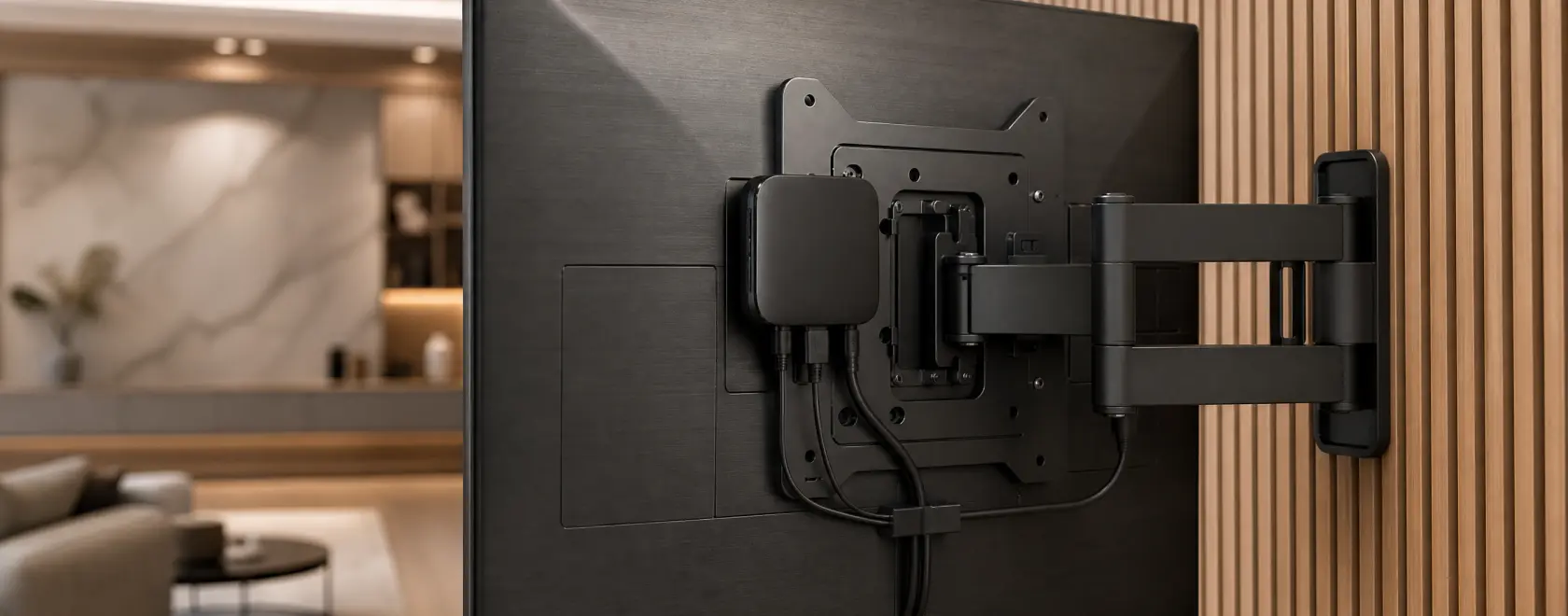
Modern IPTV set-top boxes are compact enough to be mounted behind the television using special brackets or adhesive mounting pads. Compact devices based on Android TV and Google TV are particularly well suited for this approach, as they rarely require physical access after the initial setup. This kind of hide streaming box setup works especially well when you want to keep hidden media devices out of sight.
If the television is wall-mounted, the set-top box can be attached directly behind it, leaving only the screen visible. This solution is especially popular in modern minimalist interiors. It is one of the simplest TV box placement ideas for a clean TV wall setup.
Another option is to place the device inside a TV cabinet or a wall-mounted media console. In this case, it is important to leave enough room for ventilation so that the equipment does not overheat during extended viewing sessions. A floating TV unit can also help conceal the device while keeping the area visually light.
How to Hide Cables Without Renovation
In most cases, visual clutter is caused not by the devices themselves, but by the cables. Power cords, HDMI cables, Ethernet connections, and charging cables can quickly become a tangled mess. This is why many users look for ways to hide TV cables and wires without changing the entire room layout.
Fortunately, solving this problem does not require major renovations. Special cable channels can be mounted on the wall and painted to match its color. Once installed, they become almost invisible. These cable covers for TV are among the easiest cable management solutions for a finished interior.
If the TV is placed on a cabinet, cables can be grouped using textile or plastic cable organizers. These allow multiple wires to be bundled into a single neat line instead of hanging chaotically. This helps conceal wires behind TV furniture and creates a neater hidden wires TV effect.
For IPTV users, switching to wireless connections whenever possible can also help. Modern set-top boxes support Wi-Fi, making it possible to eliminate Ethernet cables entirely if the wireless signal is strong enough.
Which Type of Set-Top Box Works Best in a Minimalist Interior?
Not all devices are equally convenient when it comes to space organization. Some models require external storage drives, additional adapters, and numerous connections.
Devices based on Linux, as well as modern Android TV and Google TV solutions, are generally more compact because most functions are already built into the system. They do not require a large number of peripherals and provide access to IPTV, VoD services, YouTube, and other applications through a single interface. This makes them suitable for a minimal TV installation setup and even for a smart home TV setup where every device should fit neatly into the overall ecosystem.
When choosing a device, it is worth paying attention not only to technical specifications but also to the size of the unit, port placement, and power options. Sometimes these details determine how clean and organized the entire TV area will look.
Minimalism Starts with the Interface
Even perfectly hidden equipment will not create a sense of order if the user is greeted by a cluttered on-screen menu. Modern platforms make it possible to customize the home screen so that only the necessary applications and channels are displayed.
Removing unnecessary shortcuts, creating favorites lists, and setting up personalized profiles help make the IPTV experience just as organized as the physical TV area itself.
The benefits become especially noticeable in households where several people use the same television. Personalized profiles allow each user to see only the content that interests them, without overcrowded menus and endless recommendation feeds.
Creating a clean and organized IPTV area does not require major investments or complex technical solutions. In most cases, it is enough to position the set-top box thoughtfully, organize the cables, and take advantage of the capabilities offered by modern platforms. Compact devices based on Android TV, Google TV, and Linux make it possible to keep your interior clean and modern without sacrificing functionality. For wall-mounted TVs, basic wall mounted TV cable management or even the option to hide cables behind wall TV can make the setup look especially polished.
As a result, the television becomes a natural part of the interior rather than a technical centerpiece of the room. And that is exactly what modern minimalism strives for: maximum functionality with minimal visual noise, an aesthetic TV wall, and a setup where technology works quietly in the background.
